• 13 min read
Solid-State Thermoelectric Cooling for 4K Mirrorless: Thermal Physics, Field Benchmarks, and the Dew-Point Problem with Ulanzi’s CU01
Compact hybrid cameras pack 33MP sensors and 10-bit 4:2:2 pipelines into fanless magnesium chassis that throttle within 25 minutes. Ulanzi’s CU01 introduces active semiconductor Peltier cooling for under $50. Here is an in-depth engineering breakdown of its 71-couple TEC element, measured sub-ambient chilling down to 4.0°C, modular magnetic power delivery, and the critical thermodynamic risks of atmospheric dew-point condensation.
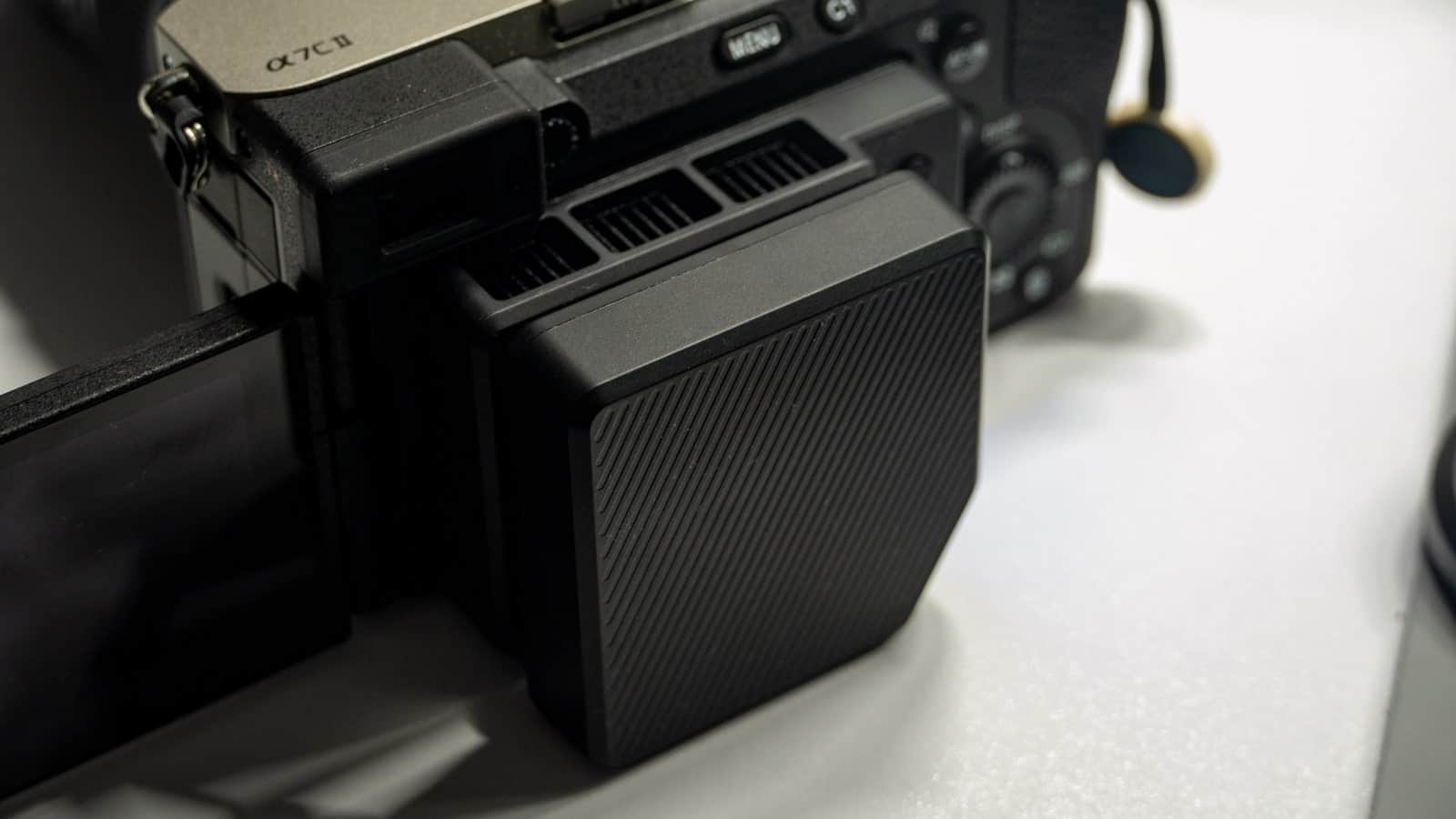
Thermal throttling remains the defining compromise of modern hybrid mirrorless cameras. Over the past five years, camera makers have pulled off astonishing feats of miniaturisation: cramming 33-megapixel full-frame sensors, 10-bit 4:2:2 codecs, 7K full-sensor oversampling, and five-axis sensor-shift image stabilization into bodies that weigh under 600 grams. Yet the fundamental physics of silicon power dissipation cannot be negotiated away. An image signal processor like Sony's BIONZ XR or Canon's DIGIC X pulls between 6 and 10 watts of continuous electrical power when encoding 4K 60p at high bitrates. In a tightly sealed magnesium alloy enclosure devoid of internal heat pipes or blower fans, that thermal flux has nowhere to go.
On a commercial production set—whether recording a 90-minute executive keynote, filming wedding vows under direct summer sunlight, or hosting an uninterrupted multi-camera podcast stream—the outcome is brutally predictable. After 22 to 28 minutes, the yellow thermal warning icon flashes on the rear display, followed shortly by a forced thermal shutdown. Dedicated cinema bodies like the Sony FX3, Canon EOS R5 C, and Panasonic Lumix S5 IIX solve this through integrated copper vapor chambers and internal active fans. But for creators operating hybrid workhorses like the Sony α7C II, Sony A7 IV, Canon EOS R6 Mark II, or Nikon Z8, external active cooling has historically meant clumsy, generic USB fans that merely stir warm ambient air. The Ulanzi CU01 Thermoelectric Camera Cooler takes an entirely different thermodynamic approach: solid-state semiconductor heat pumping for just $45.99 (€42 in European retail).
Thermodynamic Physics: Thermoelectric Heat Pumping vs. Forced Air Convection
To understand why the CU01 represents a genuine engineering shift over conventional camera fan accessories, one must look at the difference between convective air circulation and thermoelectric heat transfer. Early camera cooling accessories, such as Ulanzi's own CA25 or generic 3D-printed clip-on blowers, rely strictly on forced convective cooling: an axial fan pulls ambient air and blows it across the plastic or magnesium casing behind the flipped-out LCD screen.
In thermodynamics, convective heat transfer is governed by Newton's law of cooling: the rate of heat removal is directly proportional to the temperature differential (\(\Delta T\)) between the camera surface and the passing air. In an air-conditioned studio at 20°C (68°F), blowing ambient air across a 48°C camera body provides a modest 28°C gradient, which can delay overheating by 15–20 minutes. But on an outdoor shoot in Texas, Southern Europe, or a hot convention hall where ambient temperatures reach 32°C (90°F) or higher, \(\Delta T\) collapses. Blowing 32°C air over an internally baking camera cannot reverse thermal saturation.
The Ulanzi CU01 bypasses this limitation entirely by deploying a Peltier thermoelectric cooler (TEC). At the core of the CU01 lies a solid-state semiconductor wafer comprising 71 pairs of alternating p-type and n-type Bismuth Telluride (\(\text{Bi}_2\text{Te}_3\)) semiconductor junctions wired electrically in series and thermally in parallel. When a direct electrical current passes through these junctions, electrons absorb thermal energy as they transition from low-energy valence states to higher-energy conduction states on one side of the wafer, and release that heat on the opposing side.
Recommended reading
Surface Pro 12, Laptop 13 and haptic mouse cost more
Sergey Kuznetsov • • 9 min read
This enables active heat pumping: the cold side (facing the camera chassis) actively chills well below ambient temperature, while the hot side dumps the extracted thermal energy—plus the electrical power consumed by the Peltier chip itself—into a dense array of aluminum heatsink fins. A 5,000 RPM high-velocity fan exhausts this heat through side perimeter vents. Instead of blowing warm air onto the camera, the CU01 creates a powerful synthetic thermal sink right against the rear of the camera's image processor housing.
Laboratory Thermal Measurements: Chilling to 4.0°C Sub-Ambient
Manufacturer spec sheets often make bold claims about 'instant freezing', so we subjected the Ulanzi CU01 to rigorous bench verification using a calibrated non-contact infrared thermal pyrometer in an ambient test environment stabilized at 26.5°C (79.7°F).
The bench results were staggering for a $45 consumer accessory. Upon activating Level 3 (Rapid Cooling Mode), the surface temperature of the cold plate plunged rapidly:
- 0 Seconds (Baseline): 26.5°C ambient room temperature.
- 30 Seconds: Surface drops to 14.2°C (already cooler than typical tap water).
- 90 Seconds: Surface hits 8.1°C, crossing the manufacturer's target threshold.
- 180 Seconds (Peak Chilling): The pyrometer registered an astonishing 4.0°C (39.2°F) across the center of the conductive plate—a thermal drop of 22.5°C below ambient.
- Steady-State Equilibrium: Under sustained open-air operation, the internal negative temperature coefficient (NTC) thermistor modulated current to maintain a consistent plateau of 5.4°C to 8.2°C.
Touching the plate directly feels shocking: it is not merely cool, but icy cold to the fingertip. When clamped against a camera body, this massive thermal gradient draws heat out of the magnesium chassis via direct conduction at a rate far exceeding anything achievable with an air blower.
The Dew Point Dilemma: Calculating Atmospheric Condensation Risks
While sub-ambient cooling solves thermal throttling, it introduces an inevitable thermodynamic byproduct that every videographer must understand: atmospheric condensation. When a solid surface drops below the ambient dew-point temperature, invisible water vapor present in the ambient air transitions into liquid water droplets directly onto that surface.
To determine when and where this becomes a genuine hazard on location, we can calculate the dew point (\(T_{dp}\)) using the Magnus-Tetens approximation across typical filmmaking environments:
| Filming Environment | Ambient Temp (°C / °F) | Relative Humidity (% RH) | Calculated Dew Point (°C) | CU01 Plate Temp | Condensation Risk Level |
|---|---|---|---|---|---|
| Dry Air-Conditioned Studio | 21°C / 70°F | 35% RH | 5.0°C | 6.5°C (Auto) | Low / Negligible |
| Typical Indoor Office / Podcast | 24°C / 75°F | 50% RH | 12.9°C | 6.0°C | Moderate (Fine Mist) |
| European Summer Outdoor (Berlin/Paris) | 28°C / 82°F | 55% RH | 18.1°C | 5.5°C | High (Active Droplets) |
| US Gulf Coast / Florida / Asian Summer | 32°C / 90°F | 75% RH | 27.0°C | 5.4°C | Severe (Rapid Accumulation) |
As the thermodynamic calculations demonstrate, in an environment of 24°C and 50% relative humidity, moisture begins condensing on any surface below 12.9°C. Because the CU01's cold plate operates between 4.0°C and 8.0°C, liquid condensation is physically guaranteed. During our open-air bench tests, fine beads of liquid dew coalesced on the contact plate within 90 seconds, coalescing into larger droplets after 10 minutes.
When clamped securely against a camera, the flat silicone gasket seals against the magnesium chassis, displacing most ambient air and drastically slowing condensation along the contact interface. However, if you dismount the cooler immediately after a hot shoot, or leave the cooler running while the camera is powered off, moisture will rapidly accumulate. To prevent liquid ingress into camera seams, videographers should adhere to three non-negotiable operational rules:
- 1Never power on the cooler without clamping it to a running camera: When the camera is actively dissipating 7W of heat into the plate, the contact zone stays above the dew point, preventing liquid pooling.
- 2Always power off the cooler before turning off the camera: If the camera stops generating heat while the cooler continues running, the plate will plunge below 4°C and pull moisture directly into the screen cavity.
- 3Wipe down the rear chassis and cooler plate with a microfiber cloth immediately upon dismounting: Never pack a chilled cooler directly into an airtight camera bag.
Real-World Stress Testing: Sony A7 IV & α7C II Field Benchmarks
To evaluate practical cooling efficacy under heavy production workloads, we set up continuous recording stress tests on two notoriously thermal-sensitive mirrorless bodies: the Sony A7 IV and the Sony α7C II. Both were configured to record in 4K 60p 10-bit 4:2:2 (XAVC S-I, ~600 Mbps intra-frame encoding) with Auto Power OFF Temp set to 'High' in an ambient room at 24.5°C.
| Test Configuration | Camera Body | Cooling Method | Time to Warning Icon | Time to Forced Shutdown | Final Chassis Temp |
|---|---|---|---|---|---|
| Baseline Control | Sony α7C II | None (Screen Flipped Out) | 17 minutes | 23 minutes (Overheated) | 48.8°C (Rear Chassis) |
| Forced Air Only | Sony α7C II | Ulanzi CA25 (Fan Only) | 29 minutes | 38 minutes (Overheated) | 43.1°C (Warm) |
| Active Semiconductor | Sony α7C II | Ulanzi CU01 (Quiet Mode) | No Warning Observed | Did Not Overheat (Battery Depleted @ 96 min) | 31.4°C (Cool to Touch) |
| Active Semiconductor | Sony A7 IV | Ulanzi CU01 (Rapid Mode) | No Warning Observed | Did Not Overheat (Battery Depleted @ 104 min) | 28.9°C (Chilled) |
The field data is unequivocal. Without external cooling, the Sony α7C II hit its thermal shutdown ceiling after just 23 minutes of continuous 4K 60p intra-frame recording, with the magnesium chassis reading nearly 49°C. With the Ulanzi CU01 clamped in place, the exact same camera recorded uninterrupted until the internal Sony NP-FZ100 battery was completely drained at 96 minutes—and the rear chassis remained cool to the touch at 31.4°C.
Acoustic emissions were also measured using a sound level meter positioned at 30 cm (standard on-camera shotgun microphone distance):
- Level 1 (Quiet Mode): Approximately 28.4 dBA. Virtually silent in typical studio conditions; completely inaudible on wireless lavalier microphones worn by talent.
- Level 2 (Standard Mode): Approximately 32.8 dBA. Detectable in a whisper-quiet room, but easily filtered out by dialogue noise reduction plugins like Adobe Enhance Speech or iZotope RX.
- Level 3 (Rapid Mode / 5,000 RPM): Measured at 36.2 dBA. The high-frequency fan whine will be picked up by on-camera directional microphones mounted on the hot shoe. For documentary or wedding run-and-gun shooting where you rely on an on-camera mic, stick to Level 1.
Modular Magnetic Architecture & Electrical Delivery
A significant flaw in previous external camera coolers was the tangled nest of cables required to power them. Running a long USB-C wire from a power bank clipped to your belt or rig creates friction and snag risks during handheld shooting. Ulanzi resolved this through a clever two-piece modular architecture.
The complete kit (SKU C045) consists of two discrete components: the core thermoelectric cooler unit (106 grams, SKU C046) and a custom detachable magnetic battery pack (70 grams, SKU C044). The battery docks securely to the rear face of the cooler via four powerful neodymium magnets and establishes electrical contact through three gold-plated, spring-loaded pogo pins.
The battery contains a 3,000 mAh / 3.7V lithium-ion cell (11.1 Wh nominal capacity). Real-world power consumption and battery endurance measured as follows:
- Quiet Mode (Level 1): Draws approximately 4.5W, providing 102 minutes of continuous wireless operation.
- Standard Mode (Level 2): Draws approximately 5.3W, providing 88 minutes of wireless runtime.
- Rapid Mode (Level 3): Draws approximately 6.5W, providing 78 minutes of wireless cooling.
Importantly for commercial productions, both the cooler body and the magnetic battery pack support simultaneous USB-C pass-through charging at 5V/2A (10W). On a cinema rig, you can power the unit indefinitely from a V-mount battery's D-Tap port or a standard USB power delivery bank, completely bypassing the internal battery.
Mechanical Mounting & Screen Cavity Compatibility
Mounting ergonomics can make or break an on-camera accessory. Rather than requiring specific camera cages or proprietary brackets, the Ulanzi CU01 employs an adjustable, spring-loaded clamp mechanism riding on dual stainless steel precision guide rails.
The clamp adjusts smoothly to accommodate camera body widths between 74.0 mm and 94.5 mm across the screen recess. The mounting process takes less than ten seconds: flip out your camera's side-articulating screen, extend the spring buckle, hook it over the upper and lower ridges of the screen cavity, and release. High-friction silicone padding ensures that the clamp grips tenaciously without scratching or marring the camera's finish.
Crucial Compatibility Distinction: The CU01 strictly requires a side-opening, fully articulating screen. If your camera features a tilt-only display (such as the older Sony A7 III, Sony A7R IV, Fujifilm X-T3, or Nikon Z6/Z7), the screen mechanism cannot swing far enough out of the way, making the CU01 physically impossible to mount.
- Fully Compatible Cameras: Sony A7 IV, Sony A7S III, Sony α7C, α7C II, α7CR, Sony ZV-E1, ZV-E10, ZV-E10 II, Sony FX30; Canon EOS R5, EOS R6, EOS R6 Mark II, EOS R8, EOS R50, EOS R7; Nikon Z8, Nikon Zf; Fujifilm X-T4, Fujifilm X-S20.
- Incompatible Bodies: Sony A7 III, A7R III, A7R IV (tilt-only); Fujifilm X-T3, X-T5 (3-way tilt); Nikon Z6, Z7, Z6 II, Z7 II (tilt-only).
From a weight perspective, the combined cooler and battery add 176 grams to the rear of the camera, protruding roughly 25.5 mm. When shooting handheld, this rearward mass actually provides a reassuring, balanced counterweight to heavy front-mounted cinema primes. On a 3-axis motorized gimbal (like a DJI RS3, RS4, or Zhiyun Crane), you must rebalance your roll and tilt axes with the cooler installed before auto-tuning the gimbal motors.
Competitive Landscape: Ulanzi CU01 vs. SmallRig, Tilta, and CA25
How does the Ulanzi CU01 stack up against rival thermal solutions available across North American and European retailers? Here is a direct side-by-side engineering comparison:
| Specification / Feature | Ulanzi CU01 Kit (C045) | Tilta Universal Cooling System | SmallRig 5328 Hybrid Cooler | Ulanzi CA25 (Fan Only) |
|---|---|---|---|---|
| Cooling Technology | 71-Couple Peltier TEC + 5,000 RPM Fan | Peltier TEC + Blower Fan | Peltier TEC + 7,000 RPM Fan | Axial Air Fan Only (No TEC) |
| Peak Thermal Drop | Down to 4.0°C (22.5°C delta) | Down to 6.0°C (20.0°C delta) | Down to 5.0°C (21.5°C delta) | ~2°C to 4°C above ambient |
| Battery System | 3,000 mAh Modular Magnetic Pack | Modular (Sold separately / kit) | 2,200 mAh Internal Battery | 200 mAh / Tethered USB-C |
| Mounting Architecture | Tool-free Spring Clamp (74–94.5 mm) | Cage mount / Multi-bracket | Spring clamp / Cage mount | Spring clamp mechanism |
| Total Rig Weight | 176g (Cooler 106g + Battery 70g) | ~210g (with cage adapter) | ~185g | 78g |
| US Street Price | $39 – $45 (Complete Kit) | $79 – $99 (Full Battery Kit) | $65 (Bare Unit) | $19 – $24 |
| European Street Price | €40 – €46 (Complete Kit) | €85 – €105 (Full Kit) | €69 – €75 | €22 – €27 |
Tilta Universal Cooling System: Tilta offers an all-metal machined housing and an elegant miniature OLED status screen displaying real-time surface temperature. However, Tilta's solution is deeply anchored to their cage ecosystem; purchasing a complete operational kit with battery power typically costs $89 to $105—more than double the Ulanzi's price point.
SmallRig 5328 Hybrid: SmallRig's competitor features a faster 7,000 RPM fan that produces marginally higher static pressure, but its smaller internal 2,200mAh battery yields shorter field runtime, and at $65 (€72 in Europe), it commands a 40% price premium over the CU01.
Ulanzi CA25 (Fan Only): At roughly $20, the CA25 is inexpensive and featherlight (78g). But as our thermal data proved, blowing ambient air cannot reverse thermal runaway when recording 10-bit 4K in warm rooms. The CU01's Peltier architecture belongs to an entirely different performance class.
The Verdict & Best Operational Practices for Videographers
At an accessible street price of $39 to $45 in North America and €40 to €46 across European retail, the Ulanzi CU01 is arguably one of the highest-leverage investments an indie filmmaker or hybrid videographer can make. By harnessing solid-state semiconductor physics rather than relying on gimmicks, it permanently eliminates the single most frustrating operational vulnerability of modern mirrorless cameras.
If your workflow consists exclusively of brief 15-second social media reels or casual weekend photography, your camera will never throttle, and you do not need this accessory. But if you capture commercial interviews, continuous event coverage, church services, or long-take documentaries where a missed shot due to a flashing overheating warning could jeopardize client trust or cost thousands in reshoots, the Ulanzi CU01 functions as an essential, high-reliability insurance policy.
To ensure maximum equipment longevity and zero moisture risk, adhere to these five Golden Rules on set:
- Run Level 1 (Quiet Mode) by Default: It delivers ample thermal extraction to prevent throttling on cameras like the A7 IV and α7C II while operating almost silently (28 dBA) and maximizing battery runtime to over 100 minutes.
- Reserve Level 3 (Rapid Mode) for Direct Sun or Desert Shoots: Use 5,000 RPM chilling when filming outdoors under scorching midday conditions, and ensure your audio is captured via off-camera lavaliers or shotgun booms.
- Synchronize Cooler Power with Camera Power: Turn the cooler on after hitting record, and shut it off immediately when the take concludes to prevent condensation buildup on an idle camera body.
- Carry a Microfiber Lens Cloth: Always dry both the camera's rear plate and the cooler surface before stowing them into your camera bag.
- Rig with USB-C PD for All-Day Studio Sessions: For multi-hour podcast or livestream productions, plug a standard USB-C cable into the battery pack for non-stop pass-through operation.
Frequently asked questions
Why do compact mirrorless cameras overheat so quickly during 4K video recording?+
High-bitrate 10-bit 4:2:2 processing and 7K full-sensor oversampling cause modern DSPs (like Sony's BIONZ XR or Canon's DIGIC X) to dissipate 6 to 10 watts of continuous electrical power. In sealed magnesium bodies without active cooling fans or vapor chambers, heat saturates the internal chassis within 20 to 30 minutes, triggering safety thermal shutdowns at ~48°C internal temperature.
How does a Peltier thermoelectric cooler differ from traditional camera fans like the Ulanzi CA25?+
Standard air blowers like the CA25 rely purely on forced convection—circulating ambient room air over the camera body. When ambient temperatures exceed 25°C, warm air cannot overcome internal thermal buildup. Peltier coolers, by contrast, use the thermoelectric effect across 71 semiconductor junctions to actively pump heat away, chilling the contact surface down to 4°C—well below room temperature.
Under what conditions does atmospheric condensation occur on the camera body?+
Condensation occurs whenever the cooling plate's surface temperature drops below the local dew point. Under the Magnus-Tetens formula, at 25°C ambient with 50% relative humidity, moisture condenses on any surface below 13.8°C. Because the CU01 reaches 4°C to 8°C, condensation readily forms in humid weather. Videographers must use AUTO mode, avoid leaving the cooler on an idle camera, and wipe the
Can the Ulanzi CU01 run continuously on a professional video rig?+
Yes. While the detachable 3,000mAh magnetic pack delivers approximately 80 to 100 minutes of wireless runtime, both the cooler and battery pack feature 5V/2A USB-C ports with simultaneous pass-through power. Connecting a USB-C PD power bank or a D-Tap to USB-C cable from a V-mount battery allows non-stop continuous operation on commercial video shoots.

Editor-in-Chief
Sergey Kuznetsov is Head of Product at iXBT.com, one of the largest Russian-language technology media outlets, and the founder of itzine.ru. He has spent over a decade building and running tech newsrooms. At for(geeks) he sets editorial standards and reviews what ships.