• 5 min read
Keenable turns live web research into SQL queries
Keenable SELECT lets agents search, extract, filter and group live web data inside read-only DuckDB SQL statements.
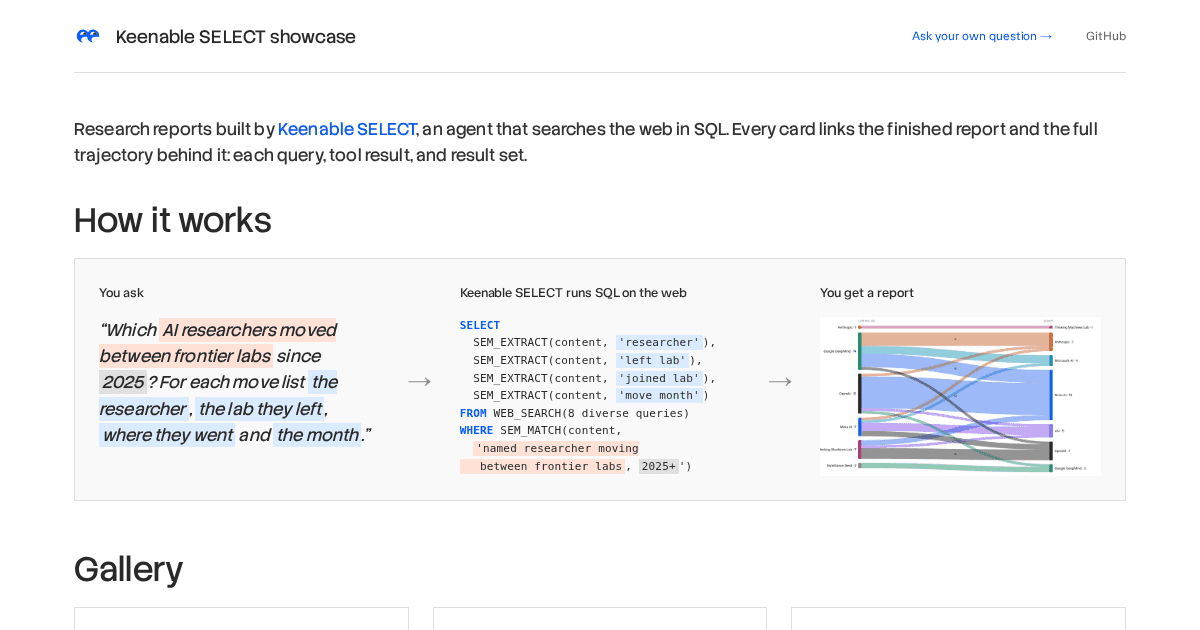
Image: Keenableai Github
Keenable treats web research as a database query. Its new SELECT system lets an agent issue a read-only DuckDB SELECT statement against live web data, combining search, page fetching and semantic extraction inside the query itself.
The system is presented through Keenable’s SELECT showcase, which displays finished research reports alongside the full execution trail: every query, tool result and result set. A sample request asks which AI researchers moved between frontier labs since 2025, then requests the researcher, former lab, new lab and month of each move. SELECT translates that request into SQL that searches multiple queries, filters pages by meaning and extracts the requested fields.
The design addresses a weakness in agentic search. A conventional web-search tool may return 10 links, leaving the agent to open each page, decide which passages matter and assemble the answer through additional model context. SELECT shifts much of that work into the query engine. A single call can search more than 1,000 pages, apply an exact WHERE clause without an LLM call, run structured extraction on the rows that survive, and then group the results.
The underlying service is an MCP server with one primary tool named select. It runs web and semantic operators outside DuckDB, inserts their output into the row set, and executes the final SQL in DuckDB. The service saves every query result as a result set with an ID, and later queries can read from that stored result.
The operators inside SELECT
Web access and model-based interpretation appear as SQL functions rather than separate tool calls. Exact SQL filters run first, so semantic operators don’t have to process every page returned by search.
| Operator | Function in the query | Cost or output behavior described by Keenable |
|---|---|---|
WEB_SEARCH | Searches several queries concurrently, merges rankings and removes duplicate URLs | Returns search results as rows |
WEB_FETCH | Fetches specified URLs | Converts each page to Markdown, one row per page |
SEM_EXTRACT | Extracts one field described in natural language | Uses one LLM call per row and returns null when the value isn’t present |
SEM_EXTRACT_ALL | Extracts every matching value | Returns the matches as a list |
SEM_MATCH | Applies a meaning-based predicate | Runs an LLM test per row and can be used in WHERE |
SEM_SCORE | Scores rows against a query | Uses a low-cost embedding score for ranking |
SEM_NORM | Normalizes semantically equivalent values | Produces a shared key for grouping |
The operators can also be composed with ordinary SQL. For example, an agent can use SEM_SCORE in an ORDER BY … DESC LIMIT k clause, or use SEM_NORM in GROUP BY to merge differently written versions of the same entity. WEB_SEARCH and WEB_FETCH can run once per row, with arguments built from row values such as name || ' founding year'.
This differs from a prompt wrapped around a search API. Exact predicates can discard rows before the model-based operators run, while the semantic functions handle tasks SQL cannot express directly, such as deciding whether a page describes “a named researcher moving between frontier labs” or extracting a field from unstructured text.
Two agents, stored results and generated reports
SELECT separates research from presentation. The research agent is a plain tool loop: an LLM writes a SELECT statement, runs it through the MCP server, examines the returned rows and continues querying until it has enough data. Follow-up questions continue from the stored transcript rather than starting a new conversation from scratch.
A second report agent runs inside generate_html_report. It receives the user’s brief, the rows from selected result sets and an authoring guide, then builds an HTML report in a sandboxed Python session. The result sets are supplied as data frames, so the model does not need to retype the collected data into the page.
The publishing loop includes a limited verification step. After rendering a draft, the server returns screenshots and the page’s JavaScript error count; the report agent can fix the document and publish again within a fixed budget. Only the final draft remains live as a shareable link.
The architecture has two audit trails: the research transcript records the agent’s tool calls and SQL, while stored result-set IDs preserve the intermediate data used by the report generator. This lets readers inspect which pages were searched and which rows were filtered out, rather than seeing only the final answer.
What SELECT changes—and what it doesn’t disclose
Keenable’s earlier NEEDLE benchmark work on search APIs measured 15 APIs and used about 124 curated RSS feeds across 52 US Google Trends geographies. SELECT is a query layer rather than another benchmark result, and the showcase does not provide independent accuracy, latency or cost measurements for its reports.
The published description specifies where model calls occur: SEM_EXTRACT uses one LLM call per surviving row, and SEM_MATCH uses an LLM test per row. That makes early exact filtering central to resource use, but the material does not state the price of those calls, the model providers involved, rate limits, retention period for stored result sets or the maximum query size.
It also doesn’t claim that every retrieved fact is correct. A semantic predicate can select the wrong page, and extraction can return null when a page lacks evidence; the showcase exposes the trajectory so a reader can inspect the inputs and intermediate rows. For engineers evaluating the system, that trace is useful, but it is not a substitute for published precision and recall numbers.
Keenable SELECT is currently demonstrated through generated reports and a live application entry point. The supplied material does not establish a public pricing plan, an enterprise SLA or a broader rollout schedule. It also leaves open whether moving research into SQL lowers total cost and improves reproducibility in real workloads once per-row model calls and web-fetch volume are included.
Frequently asked questions
What is Keenable SELECT?+
It is an MCP server that lets an agent run read-only DuckDB SELECT statements over live web data, using search, fetching and semantic operators inside the query.
How many pages can SELECT search in one call?+
Keenable says a single call can search more than 1,000 pages, then apply SQL filters and semantic operations to the resulting rows.
How much does Keenable SELECT cost?+
The supplied material does not state pricing, model-provider charges or usage limits.
A section byline, not a person: stories filed here by for(geeks) are held to the same editorial policy as every story we run.