• 6 min read
Adobe puts 70-plus creative tools inside Slack
Adobe is bringing Firefly, Photoshop, Illustrator and other tools into Slackbot, where teams can run creative workflows without leaving their conversations.
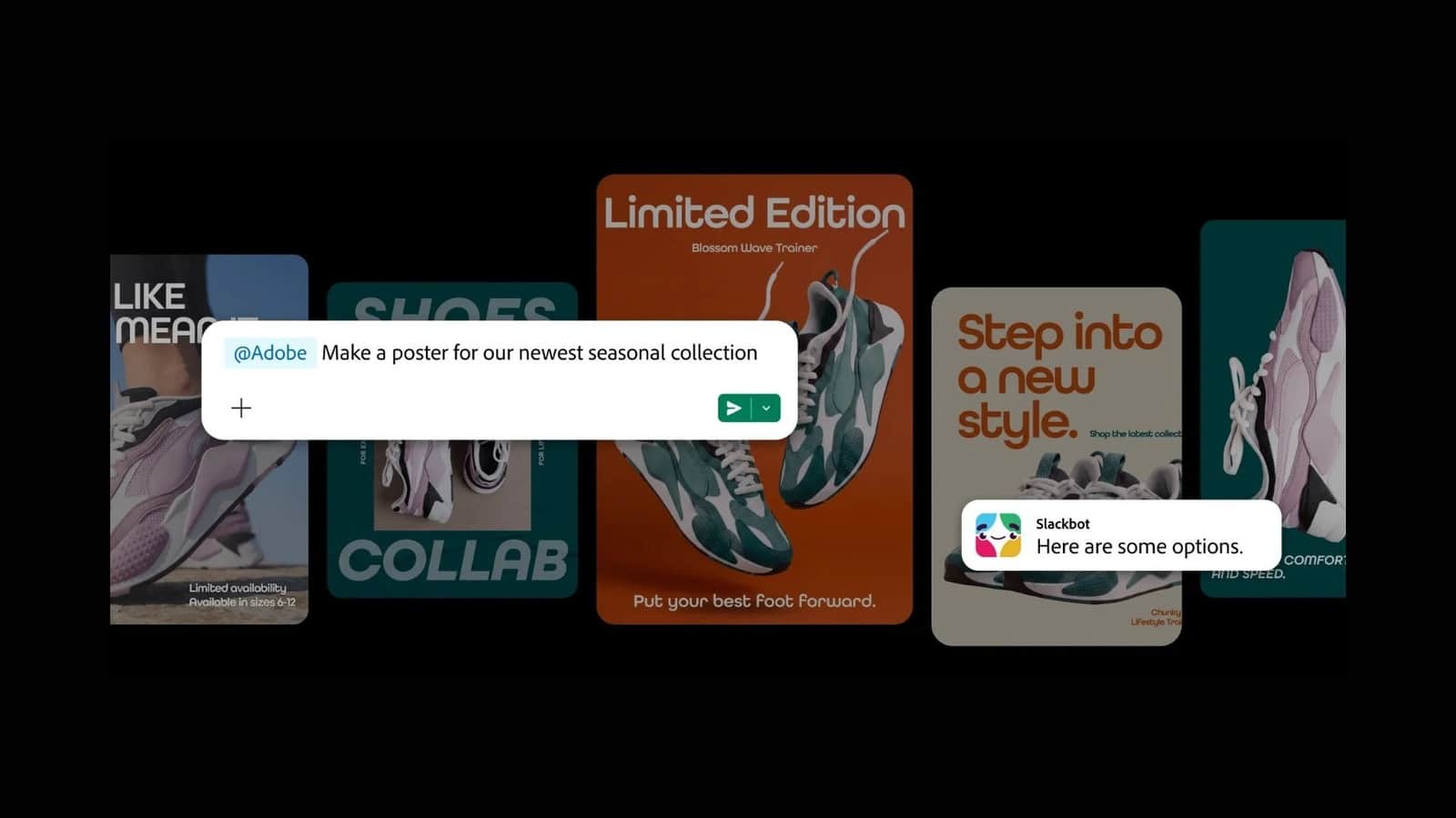
Image: Engadget
Adobe is bringing more than 70 tools from Photoshop, Illustrator, Firefly and other Creative Cloud and productivity applications into Slack. Slackbot will act as a conversational front end for creative work, handling tasks such as generating campaign assets, converting spreadsheets into visuals, applying bulk image edits and producing social content from templates.
The Adobe integration covers Firefly, Express, Photoshop, Premiere, Acrobat, InDesign, Illustrator, Stock and Lightroom. A user sends Slackbot a request in natural language, and the bot selects the relevant Adobe tools, uses material available in Slack channels and Canvases, and draws on Adobe Creative Cloud assets when connected.
The integration keeps the work in the same place as the discussion around it. Instead of sending a generated image or edited document to a separate channel, a team can work from the Slack conversation where the request began.
Adobe says an Adobe account isn’t required to use its Slack app, although signing in provides broader access to the tools. The service is available on Slack’s web, desktop and mobile clients for Business+ and Enterprise+ customers, according to the launch report.
There is one unresolved availability conflict in the supplied material. The launch coverage describes Adobe for Slack as available now, while Slack’s official MCP client announcement lists Adobe as “coming soon” in its creative and design collaboration section. For enterprise buyers, Slack’s own marketplace and administrator console are the safer sources of truth for whether the connector can actually be installed on a particular workspace.
Adobe is one connector in Slackbot’s MCP system
The Adobe feature is not a standalone chatbot plug-in. It is being delivered through Slackbot’s Model Context Protocol (MCP) client, which Slack says is generally available and can connect Slackbot to Salesforce products, partner services and internally built tools through MCP servers.
Slack’s architecture uses a common connection layer instead of one-off integrations. A company can expose an internal database, legacy system or bespoke application through an MCP server rather than writing separate low-level API integrations for every Slack workflow. Slack says those connections can be brought online in minutes rather than requiring months of custom development, although the announcement does not provide implementation benchmarks or define what “minutes” means for a production deployment.
The protocol handles more than text responses. Through MCP and Slack’s Block Kit framework, connected services can return interactive dashboards, forms, data tables, carousels and previews inside a Slack thread. Users can sign a document, update a ticket or inspect a live dashboard without opening another browser tab.
That distinction matters for Adobe’s use case. The integration is not limited to asking for a textual description of an image. The stated design allows Slackbot to route a request to a specialized application and return the resulting creative work inside the conversation, where other participants can review it.
Slack also emphasizes shared execution. A private Slackbot response can be posted into a team channel, allowing colleagues to inspect the result, check the source material and direct the next action. The company describes this as a way to move work out of isolated assistant sessions and into a shared record of decisions.
What is available through the MCP registry
Slack’s announcement names more than 20 MCP apps across engineering, document management, creative work, operations and analytics. The availability status is uneven, with several services marked as coming soon rather than generally available.
| Workflow area | Available apps listed by Slack | Coming soon |
|---|---|---|
| Product and development | Atlassian Rovo, Linear, MuleSoft, Replit, Vercel | PagerDuty |
| Documents and content | Box, Gamma, Webflow | Notion |
| Creative and design | Canva, Figma, Miro | Adobe |
| Business operations | Brex, Docusign, HiBob, Ironclad, Reclaim.ai by Dropbox, Zoom | None listed |
| Analytics and visual collaboration | Amplitude, Lucidchart, Lucidspark | Tableau Next |
Slack’s documentation gives examples of how the system should operate across applications. An engineering lead could ask which Linear tickets are blocking a release and whether related PagerDuty incidents are active; Slackbot would combine ticket and incident information in one thread and expose controls for reassigning work. A marketer could retrieve social layouts from Canva alongside a campaign mood board, while a sales representative could ask Docusign to draft an agreement and review its terms and signature fields in Slack.
For document-heavy teams, Slack says connected services can search multiple storage platforms at once and render matching files as interactive thumbnails. For analytics work, it describes placing a Tableau Next chart beside a Lucidchart user-flow diagram so a team can examine a metric and discuss a proposed fix in the same thread. Those examples depend on the relevant connectors and permissions being configured; they are not evidence that every named workflow is already live.
Permissions are enforced at the user level
Slack says the MCP client inherits its native compliance, security and permission controls. If a user lacks credentials for a restricted database or third-party project, Slackbot should block the request rather than expose that information through a shared conversation.
Administrators get a centralized console to discover, install, manage and audit app access approvals and data boundaries. That gives IT teams one control surface for a growing set of connectors, but the supplied announcement does not detail retention periods, model providers, audit-log fields, encryption configuration or how generated Adobe assets are handled after they appear in Slack. Those details may determine whether a regulated organization permits the integration.
The permission model also creates a practical limitation: Slackbot can only unify the systems that a particular user is authorized to access. A channel may contain a shared response, but the underlying information is still bounded by the requesting user’s credentials. Slack says those boundaries are applied in real time; it does not describe how permission changes are reflected in previously posted responses or generated assets.
“The future of work isn’t a single AI assistant; it’s a connected ecosystem of intelligent tools. Teams should be able to achieve this with the tools they already trust and use every day.”
Pricing and availability
Adobe’s Slack integration is tied to Slack’s Business+ and Enterprise+ plans, but neither the supplied launch coverage nor Slack’s MCP announcement gives a separate price for the Adobe connector. Adobe account requirements are also split: no Adobe account is required for basic use, while an account enables fuller access to the tools.
Slack’s MCP client is presented as a generally available platform, with apps distributed through a new MCP registry in Slack Marketplace. Individual connectors can have different launch states, and Adobe’s conflicting “available now” and “coming soon” descriptions make the marketplace listing particularly important for US organizations deciding whether to deploy it.
The change is less about adding another image-generation command to Slack than about making Slackbot a routing layer across a company’s existing software. If the permissions, interactive components and app actions work as described, a request can move from conversation to execution without a chain of copied prompts and browser tabs. The immediate constraint is not the number of announced integrations; it is which connectors are installable today, what each one can actually do, and how much access enterprise administrators are willing to grant.
Frequently asked questions
Is Adobe for Slack available now?+
Launch coverage describes it as available now for Slack Business+ and Enterprise+ customers. Slack’s official MCP announcement lists Adobe as coming soon, so availability should be checked in Slack Marketplace.
Do I need an Adobe account to use the Slack integration?+
No Adobe account is required for the Slack app’s basic use. Signing in to Adobe provides more complete access to the available tools.
Which Adobe apps work with Slackbot?+
The integration includes Firefly, Express, Photoshop, Premiere, Acrobat, InDesign, Illustrator, Stock and Lightroom.
How much does Adobe for Slack cost?+
No separate price for the Adobe connector is provided. The integration is described as available to Slack Business+ and Enterprise+ customers.
A section byline, not a person: stories filed here by for(geeks) are held to the same editorial policy as every story we run.